

Phone: Call us on: 0344 3519112 Opening hours: 9am - 6pm (Mon & Thu - Fri) and 10am - 6pm (Tue - Wed)
Email: loansteam@novunapersonalfinance.co.uk
Write: Novuna Personal Finance, 2 Apex View, Leeds, LS11 9BH
1. Once your application is approved, we'll email you a secure link for you to sign your loan agreement online.
2. Have your mobile phone ready, as you'll receive an authorisation code to complete the security check.
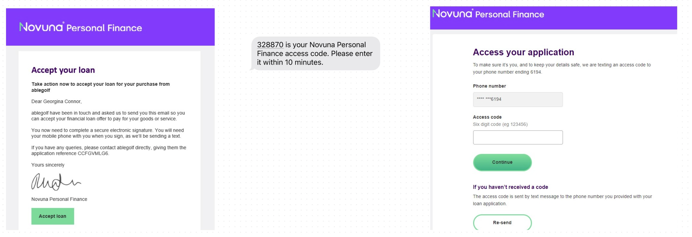
3. Click Continue to review your agreement.

4. If you agree with the terms and conditions of the loan, select the 'sign' icon, then click the 'pen icon' to sign. You'll have 1 hour to complete this but can be extend if needed. After 1hr you'll need to go back to your original email.
5. Once signed you'll receive the below to advise your application has been completed.


6. When you have received the funds or goods you'll receive our welcome email that provides you with your agreement number and details to register My Novuna Personal account to manage your account.

Phone: Call us on: 0344 3519112 Opening hours: 9am - 6pm (Mon & Thu - Fri) and 10am - 6pm (Tue - Wed)
Email: loansteam@novunapersonalfinance.co.uk
Write: Novuna Personal Finance, 2 Apex View, Leeds, LS11 9BH
Sorry an error has occured, please try again