

Online: My Novuna Personal account
Phone: Call us on: 0344 3755500 Opening hours: 9am - 5pm (Mon - Weds & Fri) and 10am - 5pm (Thu)
Email: customerservice@novunapersonalfinance.co.uk
Write: Novuna Personal Finance, 2 Apex View, Leeds, LS11 9BH
Take full control of your account and payments by creating an online account.
Registering is easy, and once you've created your account, this can be accessed on our website or via our My Novuna Personal Finance mobile app (available for iOS and Android devices).
How to register
You'll be able to register once you've received your goods or; funds if you've applied for personal loan. When creating your account, you'll first need to confirm the following details from your agreement:
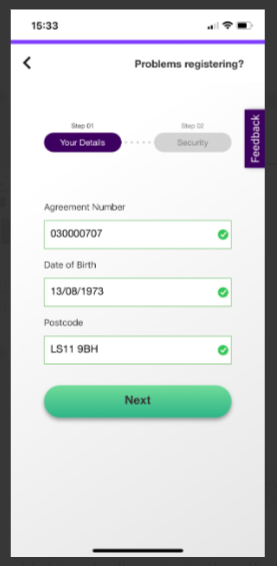
If you can’t find your agreement number, it’s usually near the top of the initial emails or letters we sent to you confirming your agreement. If you pay by Direct Debit, your agreement number appears in the Direct Debit reference on your bank statement.
We obviously take security very seriously, so in addition to confirming the personal details above (that need to match those we hold for you), you'll also need to choose a:
Logging into my account
Click Log in, then enter your email and password, followed by your 6 digit PIN.
Forgotten your login details?
If you've forgotten any of these details, don't worry you can reset them here.
After 5 failed attempts to login, access to your account will lock for 1 hour. Once your password is reset, this lock is removed.
Please remember, you'll only receive an email from us when the address entered matches that on your account. Our email may take up to 20 minutes, and could end up in your junk folder.
Online: My Novuna Personal account
Phone: Call us on: 0344 3755500 Opening hours: 9am - 5pm (Mon - Weds & Fri) and 10am - 5pm (Thu)
Email: customerservice@novunapersonalfinance.co.uk
Write: Novuna Personal Finance, 2 Apex View, Leeds, LS11 9BH
Sorry an error has occured, please try again